
Every computational materials group has at least one 800-line script that parses VASP output with regular expressions. Usually it was written by someone who left two years ago, and nobody dares touch it.
All of them are reimplementations of things these eight libraries already do, tested, with documentation. The selection criterion here is narrow: I have used each of these in anger, and each replaced code I had written badly myself.
In this post:
- The two you learn first
- The four that do one thing precisely
- The two that connect materials to machine learning
- What to skip, and the honest catches
The two you learn first
1. pymatgen — structures, symmetry, phase diagrams
The standard object model for a crystal structure in Python, and the engine behind the Materials Project. It reads and writes essentially every format you will meet (CIF, POSCAR, cif from the ICSD, Quantum ESPRESSO input), applies symmetry operations, builds supercells, slabs and interfaces, constructs phase diagrams from formation energies, and parses VASP output into objects rather than strings.
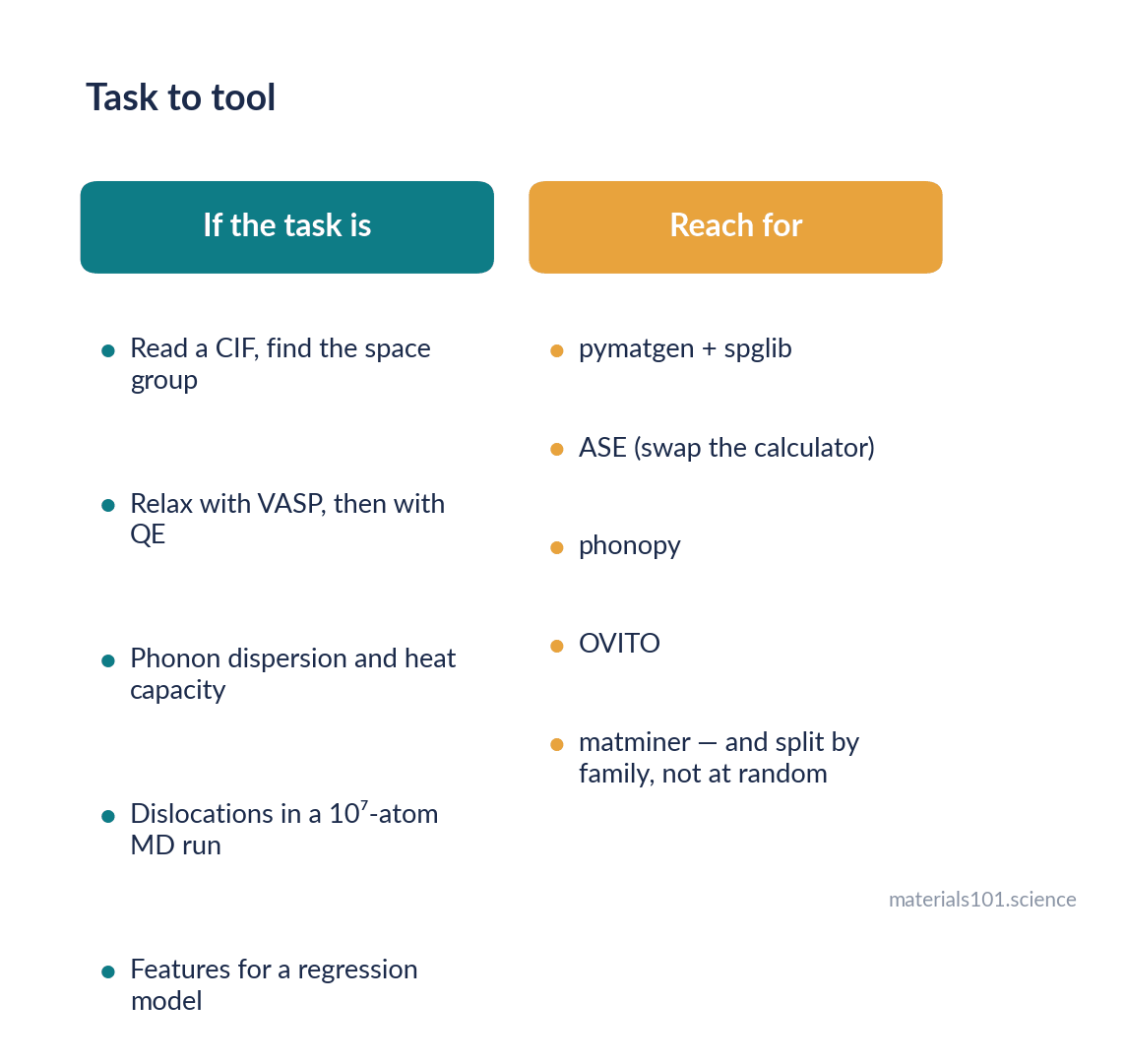
Start with: Structure.from_file(), SpacegroupAnalyzer, and the vasprun.xml parser. Those three replace most homegrown parsing.
The catch: it is large and opinionated, the API has changed across major versions, and some examples online no longer run. Pin your version in any project you intend to reproduce.
2. ASE (Atomic Simulation Environment) — the universal calculator interface
Where pymatgen models structures, ASE runs calculations. Its central idea is the calculator: you attach one to an Atoms object and ask for energies and forces, and the same script then works whether the backend is VASP, Quantum ESPRESSO, GPAW, LAMMPS or a machine-learned potential. It also provides optimisers, molecular dynamics, nudged elastic band, phonon workflows and a genuinely useful GUI.
Start with: attach a calculator, run BFGS to relax a structure, then swap the calculator for a different code without touching the rest of the script. That one exercise teaches the design.
The catch: ASE’s own MD is convenient rather than fast. For long trajectories, drive LAMMPS instead and use ASE for setup and analysis.
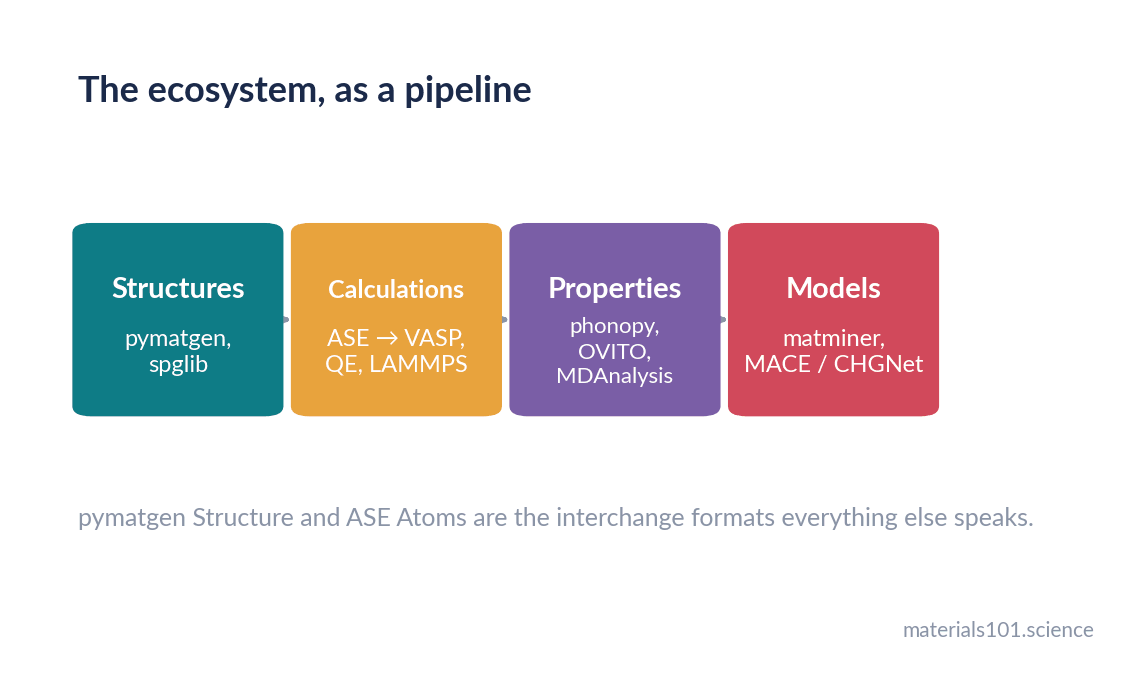
If you only learn two things from this list, learn these two. Almost every other tool here consumes an ASE Atoms or a pymatgen Structure.
The four that do one thing precisely
3. spglib — symmetry, correctly
Finds the space group of a structure, reduces it to primitive or standardises it to conventional, generates irreducible k-point meshes and identifies symmetry-equivalent sites. It is small, fast, written in C with Python bindings, and it is what pymatgen and ASE call underneath.
Why it matters on its own: symmetry tolerance. get_spacegroup(structure, symprec=1e-5) and symprec=1e-2 can give different answers for a DFT-relaxed structure, and knowing that saved me from reporting a spurious symmetry-breaking result.
4. phonopy — phonons and thermal properties
Generates the displaced supercells you need, collects the force sets your DFT code returns, and gives you force constants, phonon dispersions, densities of states, free energies, heat capacities and thermal expansion. The standard tool, and it interfaces with essentially every DFT code through ASE or directly.
The catch: imaginary frequencies at Γ nearly always mean your structure was not properly relaxed, not that the material is dynamically unstable. Check the relaxation before you write the interesting paragraph about instability.
5. OVITO (Python module) — analysing millions of atoms
Post-processing for large molecular dynamics trajectories: common neighbour analysis, dislocation extraction, Voronoi volumes, cluster identification, coordination analysis, and rendering that is publication-quality without fighting it. The GUI is excellent for exploring; the Python module is what you put in a pipeline.
The catch: some analysis modifiers are in the Pro version. Check before designing a workflow around one.
6. MDAnalysis — trajectories as arrays
Reads essentially every trajectory format and gives you frames as NumPy arrays, with radial distribution functions, mean squared displacements, hydrogen-bond analysis and time-correlation machinery on top. More common in biomolecular work, and underused in materials.
Use it when your analysis question is really an array question and you want to avoid writing another frame-reading loop.
The two that connect materials to machine learning
7. matminer — features and datasets
Turns a structure or composition into a feature vector suitable for machine learning, with several hundred implemented descriptors, plus loaders for standard datasets and figure helpers. It is the bridge between “I have structures” and “I have a design matrix”.
The catch, and it is a real one: it is easy to generate 300 features from 200 samples and produce a model that is pure overfitting. Featurise deliberately, and always hold out a test set chosen by composition or structure family rather than at random, otherwise near-duplicate entries leak between train and test and your reported error is fiction.
8. A machine-learned potential library — MACE, CHGNet or similar
The current generation of universal potentials ship as pip-installable packages with ASE calculator interfaces, which means three lines gets you near-DFT forces on a system you have never parameterised. Use one as a starting point and fine-tune on your own DFT data for quantitative work.
The catch: they fail silently outside their training distribution. Ensembles and uncertainty estimates are not optional extras.
Going deeper
One layer above all of these sits workflow orchestration — atomate2, jobflow, AiiDA, FireWorks. They handle job submission, dependency graphs, restarts and provenance for thousands of calculations, and they are indispensable for high-throughput work. They are also a significant investment to learn, and they solve a problem you do not have until you are running hundreds of jobs. Learn the eight above first; adopt orchestration when manual bookkeeping becomes the bottleneck, not before.
In practice
Three habits that matter more than which libraries you pick. Pin your versions — pip freeze > requirements.txt at the start of a project, because a pymatgen minor release can change a default and quietly shift your numbers. Put the analysis in a script, not a notebook — notebooks are for exploring, scripts are for results you will need to reproduce for a reviewer eighteen months later. And generate every figure in a paper from one script, so that when a referee asks for a different axis limit you change one line rather than remaking six plots by hand.
What to skip
- Writing your own CIF or POSCAR parser. It has been done, correctly, including the edge cases you have not thought of.
- Writing your own symmetry finder. Especially this one.
- Reaching for deep learning on 50 data points. A linear model with three sensible descriptors will beat it and you will be able to explain it.
Common misconceptions
- “pymatgen and ASE do the same thing.” They overlap, but pymatgen is strongest at structures, symmetry and thermodynamic analysis; ASE is strongest at driving calculations across many codes. Most real workflows use both and convert between them.
- “A universal potential removes the need for DFT.” It removes the need for most DFT. You still need DFT for the training data, for validation, and for electronic properties a potential does not predict at all.
- “More features means a better model.” With small materials datasets the opposite is usually true.
Key takeaways
- pymatgen for structures, symmetry and thermodynamics; ASE for driving calculations across codes. Learn these two properly first.
- spglib for symmetry (and mind the tolerance), phonopy for vibrational properties, OVITO for large MD analysis, MDAnalysis for trajectory arrays.
- matminer bridges structures to machine learning, and its main risk is overfitting via careless featurisation and random splits.
- A universal machine-learned potential gives you near-DFT forces in three lines, and fails silently outside its training data.
- Pin versions, script rather than notebook, and generate every paper figure from one script.
Frequently asked questions
What Python library should I learn first for materials science?
pymatgen, then ASE. pymatgen gives you a proper structure object with symmetry and thermodynamic analysis; ASE lets you attach any calculator and run the same script against different codes. Nearly everything else consumes one of their objects.
What is the difference between pymatgen and ASE?
pymatgen is oriented around describing and analysing materials — structures, symmetry, phase diagrams, parsing DFT output. ASE is oriented around running calculations, with a uniform calculator interface across many codes plus optimisers and MD. They convert to each other, and most workflows use both.
How do I calculate phonons in Python?
Use phonopy: it builds the displaced supercells, takes the forces from your DFT code, and returns force constants, dispersions and thermodynamic properties. Relax the structure carefully first — imaginary frequencies at Γ are usually a relaxation problem.
Is matminer still the standard for materials machine learning features?
It remains the most complete featuriser library and is widely used. For structure-based property prediction, graph neural networks that learn their own representation now often outperform hand-built descriptors, so treat matminer as one option rather than the default.
Do I need a workflow manager like atomate2?
Not until manual job bookkeeping becomes your bottleneck — typically past a hundred calculations. Below that, scripts plus version pinning are simpler and easier to debug.
Next read
- Your first LAMMPS simulation, step by step — the code these libraries most often drive
- What is a machine-learned interatomic potential? — what the eighth library on this list is doing
References
Both figures in this post are schematic; no data is plotted. The papers below are
the ones to cite when you use each library.
- S. P. Ong, W. D. Richards, A. Jain, G. Hautier, M. Kocher, S. Cholia, D. Gunter, V. L. Chevrier, K. A. Persson and G. Ceder, Python Materials Genomics (pymatgen): A robust, open-source python library for materials analysis, Computational Materials Science 68, 314–319 (2013). doi:10.1016/j.commatsci.2012.10.028
- A. Hjorth Larsen et al., The atomic simulation environment — a Python library for working with atoms, Journal of Physics: Condensed Matter 29, 273002 (2017). doi:10.1088/1361-648X/aa680e
- A. Togo, K. Shinohara and I. Tanaka, Spglib: a software library for crystal symmetry search, arXiv preprint (2018). arXiv:1808.01590 — cite the current version noted in the spglib documentation.
- A. Togo and I. Tanaka, First principles phonon calculations in materials science, Scripta Materialia 108, 1–5 (2015). doi:10.1016/j.scriptamat.2015.07.021
- A. Stukowski, Visualization and analysis of atomistic simulation data with OVITO — the Open Visualization Tool, Modelling and Simulation in Materials Science and Engineering 18, 015012 (2010). doi:10.1088/0965-0393/18/1/015012
- N. Michaud-Agrawal, E. J. Denning, T. B. Woolf and O. Beckstein, MDAnalysis: A toolkit for the analysis of molecular dynamics simulations, Journal of Computational Chemistry 32, 2319–2327 (2011). doi:10.1002/jcc.21787
- L. Ward et al., Matminer: An open source toolkit for materials data mining, Computational Materials Science 152, 60–69 (2018). doi:10.1016/j.commatsci.2018.05.018
- I. Batatia, D. P. Kovács, G. N. C. Simm, C. Ortner and G. Csányi, MACE: Higher Order Equivariant Message Passing Neural Networks for Fast and Accurate Force Fields, NeurIPS (2022).
Written by Dinesh Varma, PhD scholar in computational materials science.
Spotted an error? Tell me — corrections are credited.